
How to Build a Docs-Only Support Assistant for Your Product Site
Build a docs-scoped support assistant using Prismfy domain search — with a complete Python example, LLM integration, and guardrails for when docs don't have the answer.
Prismfy Team
April 17, 2026
How to Build a Docs-Only Support Assistant for Your Product Site
If users ask support questions, the fastest answer is usually already in your docs. The problem is not lack of information — the problem is retrieval.
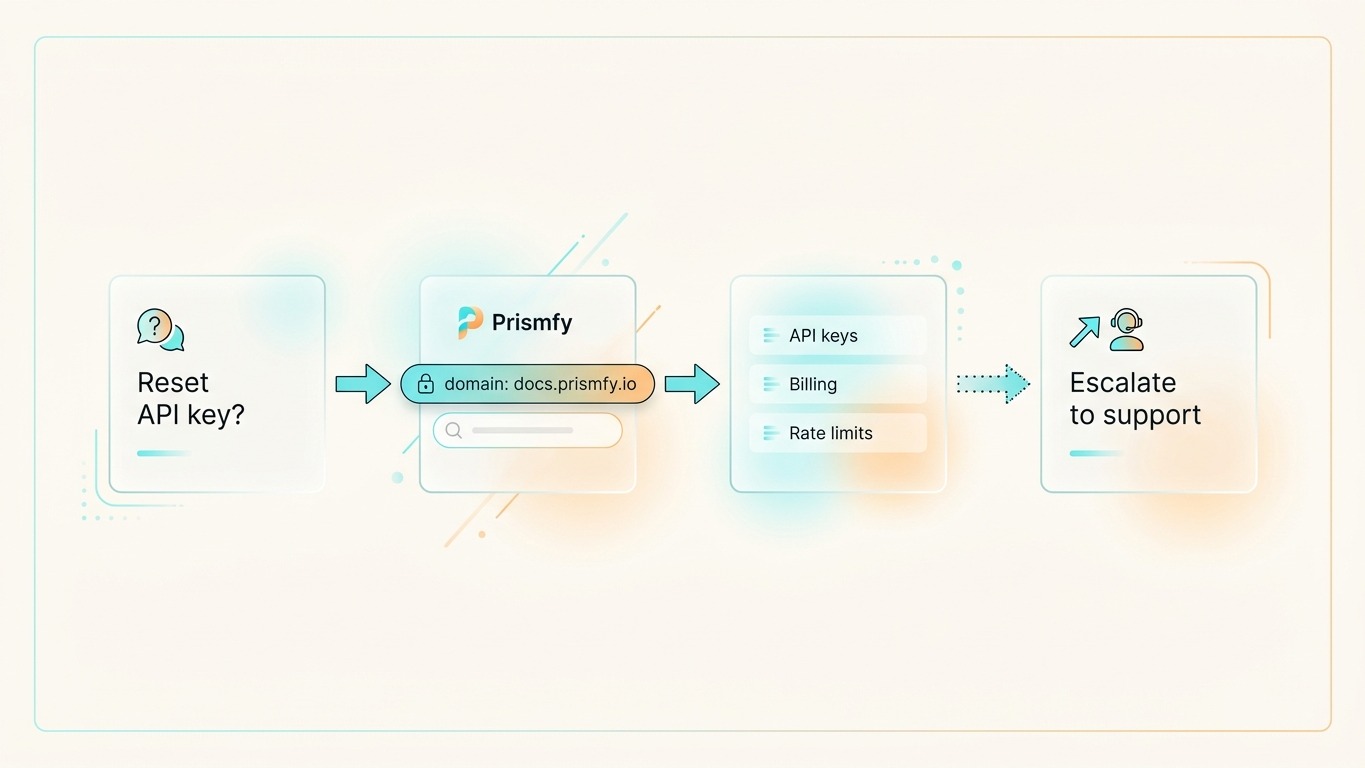
A docs-only assistant solves that by searching exclusively your documentation domain and answering from those results. No hallucination, no roaming the open web, no invented product behavior.
What this assistant should do
The assistant should be deliberately narrow:
- Search only your docs domain — nothing else
- Return a small set of relevant passages
- Answer only from those passages
- Admit when the docs do not cover the question
That keeps answers accurate and prevents the model from guessing at product behavior it has not seen.
Step 1 — Search your docs domain
Prismfy supports a domain filter that scopes results to a single site. Point it at your documentation and the search engine handles the rest.
curl -X POST https://api.prismfy.io/v1/search \
  -H "Authorization: Bearer ss_live_YOUR_KEY" \
  -H "Content-Type: application/json" \
  -d '{
    "query": "how do I rotate API keys?",
    "domain": "docs.yourproduct.com",
    "engines": ["brave", "bing"],
    "language": "en"
  }'
The response comes back with results — each result has a title, url, and content snippet pulled directly from your docs pages. No scraping setup, no proxy config, no CAPTCHA handling.
Step 2 — Wire it into a support assistant
Here is a complete, runnable example using the Anthropic SDK:
import anthropic
import requests

PRISMFY_KEY = "ss_live_YOUR_KEY"
DOCS_DOMAIN = "docs.yourproduct.com"

client = anthropic.Anthropic()

def search_docs(question: str) -> list[dict]:
    """Search your docs domain and return the top results."""
    resp = requests.post(
        "https://api.prismfy.io/v1/search",
        headers={"Authorization": f"Bearer {PRISMFY_KEY}"},
        json={
            "query": question,
            "domain": DOCS_DOMAIN,
            "engines": ["brave", "bing"],
        },
        timeout=30,
    )
    resp.raise_for_status()
    return resp.json().get("results", [])[:4]


def format_context(results: list[dict]) -> str:
    """Format search results as a context block for the LLM."""
    if not results:
        return ""
    return "\n\n".join(
        f"[{i+1}] {r['title']}\n{r['url']}\n{r.get('content', '').strip()}"
        for i, r in enumerate(results)
    )


def answer_support_question(question: str) -> str:
    """Answer a support question grounded in docs search results."""
    results = search_docs(question)

    if not results:
        return (
            "I could not find relevant documentation for that question. "
            f"You can browse the full docs at https://{DOCS_DOMAIN} "
            "or contact support directly."
        )

    context = format_context(results)

    message = client.messages.create(
        model="claude-opus-4-5",
        max_tokens=512,
        system=(
            "You are a product support assistant. "
            "Answer questions ONLY using the documentation excerpts provided. "
            "If the excerpts do not contain enough information, say so clearly — do not guess. "
            "Always cite the source URL at the end of your answer."
        ),
        messages=[
            {
                "role": "user",
                "content": (
                    f"Documentation excerpts:\n\n{context}\n\n"
                    f"Support question: {question}"
                ),
            }
        ],
    )

    return message.content[0].text


# Example
answer = answer_support_question("How do I rotate my API keys?")
print(answer)
What a good response looks like
To rotate your API keys, go to Dashboard → API Keys and click "Create new key".
Copy the new key immediately — it is only shown once. Then delete the old key
from the same page.

Source: https://docs.yourproduct.com/authentication/api-keys
Short, grounded, sourced. The model does not add anything beyond what the docs say.
Step 3 — Handle the "not in docs" case
The most important guardrail is what happens when search returns nothing — or returns results that do not actually answer the question.
def answer_support_question(question: str) -> str:
    results = search_docs(question)
    context = format_context(results)

    # If retrieval came back empty, do not ask the model to guess
    if not context:
        return (
            "I could not find that in the documentation. "
            "Please contact support at support@yourproduct.com."
        )

    # Pass context to the model with a strict grounding instruction
    ...
This prevents the assistant from hallucinating product behavior when the docs do not have an answer.
Why scope to docs only
| Approach | Risk |
|---|---|
| Open web search | Model can find outdated blog posts, wrong answers, competitor pages |
| Vector DB over docs | Requires embedding pipeline, index maintenance, chunking decisions |
| Docs domain search | Live index, no maintenance, scoped to exactly your content |
The domain filter gives you the benefits of retrieval-augmented generation without a vector database or embedding pipeline. The search index is always current — it reflects what is on your docs site right now.
Common mistakes
Searching the full web first. The model will find Stack Overflow answers, outdated tutorials, and competitor docs. Use the domain filter from the start.
Answering when retrieval comes back empty. If search returns nothing, say so. An "I don't know" is far better than a confident wrong answer.
Dumping full page content into context. The content snippet from each result is already a short excerpt. Use the top 3–4 results and nothing more.
Hiding source links. Always show the user where the answer came from. It builds trust and lets them read the full page if they need more detail.
When to use this pattern
This works best when:
- Your docs are indexed by search engines (public-facing, not behind a login)
- Support questions map closely to documentation topics
- You want live answers without maintaining an embedding pipeline
For docs behind authentication (internal wikis, Notion, Confluence), you need a different approach — either a vector store over exported content or a direct API integration.
Try it free
Add real-time web search to your AI
Free tier includes 1,000 one-time requests. No credit card required.